Implementing CPU Scheduling Algorithms using Java: Part 2

I am a Software Engineer highly skilled in JavaScript(React) for the Front End, Node for the Back End and Java. I am also a Technical Writer passionate about simplifying complex concepts for maximum understanding by a community of users.
Hello again! Welcome to the second part of the 2-part series titled Implementing CPU Scheduling Algorithms using Java. In this part, you will learn the implementation of the Shortest Job First Scheduling Algorithm using Java, which would be just as interesting or even more interesting than the first part! Before we dive in, let's see what we discussed in the first part.
Summary of Part 1
In the first part of this series, we talked about the meaning of CPU Scheduling, the purpose of CPU Scheduling in handling processes, the various types of CPU Scheduling and how to implement the First Come First Serve CPU Scheduling Algorithm using Java. We went further to explain the terms associated with CPU Scheduling which include Burst Time, Arrival Time, Waiting Time, and Turnaround Time and how to implement the logic behind these terms using Java. We will be implementing all these in this part using the Shortest Job First Algorithm. So sit back and let's dive in!
Prerequisite
To understand the concepts that will be discussed in this article, you must have read through the first part of this series or must have a knowledge of :
CPU Scheduling Algorithms
Concepts including Arrival Time, Burst Time, Waiting Time and Turnaround Time.
Java
If you have all these checked, great! Now let's proceed with learning.
Shortest Job First
Before we get to its implementation with Java, let's see what the Shortest Job First CPU Scheduling Algorithm is all about. We understand that the entire purpose of CPU Scheduling Algorithms is to determine the manner in which processes are to be executed. The Shortest Job First Scheduling Algorithm executes processes according to the length of their Burst time, that is, it executes the process with the shortest burst time. A more appropriate name for this algorithm is the Shortest Job Next Algorithm because it is the burst time of the next process that is examined.
While the First Come First Serve Algorithm executes processes according to their arrival time, the Shortest Job First Algorithm executes processes according to their burst time. Suppose there are three processes P1, P2 and P3. P1 has a burst time of 5 milliseconds, P2 has a burst time of 7 milliseconds and P3 has a burst time of 3 milliseconds. Using the implementation of the Shortest Job First algorithm, P3 gets executed first since it has the smallest burst time of 3 milliseconds, P1 gets executed second, while P3 gets executed third or last. Let's see how we would represent it on a table:
| Processes | Arrival Time | Burst Time |
| P1 | 0 | 5 |
| P2 | 0 | 7 |
| P3 | 0 | 3 |
We have set our arrival time to be 0, so turnaround time = completion time. After the implementation of the Shortest Job First Algorithm, the processes are arranged like this:
| Processes | Arrival Time | Burst Time |
| P3 | 0 | 3 |
| P1 | 0 | 5 |
| P2 | 0 | 7 |
Code Implementation
In this section, you will learn how to implement the Shortest Job First Algorithm using Java and calculate the waiting time and turnaround time for the processes. I will be using the JDoodle online Java compiler to run our Java codes and I would recommend it for the purpose of this tutorial if you do not have any compiler installed on your computer. It is lightweight, fast and efficient. Let's dive in!
Import Packages
import java.io.* //provides input and output stream
import java.util.*; //collections framework
So that we do not explicitly write our own functions, we import the java.io package that allows system input and output through streams which is used to read and write data to files or other input/output sources. We also import java.util which is a framework that supports a variety of operations including utility classes.
Variable Declaration
class Process {
    String name;
    int burstTime;

    public Process(String name, int burstTime) {
        this.name = name;
        this.burstTime = burstTime;
    }
}
In the implementation of the Shortest Job First Algorithm, we are concerned with two parameters; the name of the process and the burst time. These two parameters will determine how our processes will be executed in the algorithm. In this code snippet, we initialize our process name using the name variable and burst time using the burstTime variable.
Process Creation
public class ShortestJobFirst {

    public static void main(String[] args) {
        List<Process> processes = new ArrayList<>();
        processes.add(new Process("P1", 5));
        processes.add(new Process("P2", 7));
        processes.add(new Process("P3", 3));

        List<Process> schedule = sjf(processes);
Here, we have created an instance of our class with the name ShortestJobFirst, and then created three processes using the List Interface which we imported from our java.util package. The list accepts all the instances of our process in an array.
Print Execution Order and Sorting
  // Print the execution order
        for (Process p : schedule) {
            System.out.println("Process " + p.name + " is executed.");
        }
    }

    public static List<Process> sjf(List<Process> processes) {
        List<Process> schedule = new ArrayList<>();
        PriorityQueue<Process> readyQueue = new PriorityQueue<>(Comparator.comparingInt(p -> p.burstTime));
Here, we print out the output to the console after it has been sorted. The List Interface sorts out the processes sequentially, hence the need for sorting to suit the SJF algorithm. The Comparator Interface is used for sorting, it compares the burst time of all the processes and outputs the processes with the least burst time first in the console.
Newly Arrived Processes
        int currentTime = 0;

        while (!processes.isEmpty() || !readyQueue.isEmpty()) {
            // Add newly arrived processes to the ready queue
            while (!processes.isEmpty() && processes.get(0).burstTime <= currentTime) {
                readyQueue.add(processes.remove(0));
            }

            // If ready queue is empty, move the current time to the next process arrival time
            if (readyQueue.isEmpty()) {
                currentTime = processes.get(0).burstTime;
                continue;
            }
Here, we want to tell Java, "Hey, if we get any new processes, I want them to move into the ready queue, and not to be sorted out immediately." Also, to move the current time to the next process arrival time. This is the default occurrence in Scheduling Algorithms when there is more than one process to execute.
Sorting Burst Time
  // Execute the process with the smallest burst time
            Process currentProcess = readyQueue.poll();
            currentTime += currentProcess.burstTime;

            schedule.add(currentProcess);
        }

        return schedule;
    }
}
And here we are, perhaps the most important part of the codebase; executing processes according to their burst time. As we have said in this article, that's what the Shortest Job First Scheduling Algorithm is based on.
Summing it up — Codebase
Gathering all the bits of code, our final codebase looks like this:
import java.io.* //provides input and output stream
import java.util.*; //collections framework

class Process {
    String name;
    int burstTime;

    public Process(String name, int burstTime) {
        this.name = name;
        this.burstTime = burstTime;
    }
}

public class ShortestJobFirst {

    public static void main(String[] args) {
        List<Process> processes = new ArrayList<>();
        processes.add(new Process("P1", 5));
        processes.add(new Process("P2", 7));
        processes.add(new Process("P3", 3));


        List<Process> schedule = sjf(processes);

        // Print the execution order
        for (Process p : schedule) {
            System.out.println("Process " + p.name + " is executed.");
        }
    }

    public static List<Process> sjf(List<Process> processes) {
        List<Process> schedule = new ArrayList<>();
        PriorityQueue<Process> readyQueue = new PriorityQueue<>(Comparator.comparingInt(p -> p.burstTime));

        int currentTime = 0;

        while (!processes.isEmpty() || !readyQueue.isEmpty()) {
            // Add newly arrived processes to the ready queue
            while (!processes.isEmpty() && processes.get(0).burstTime <= currentTime) {
                readyQueue.add(processes.remove(0));
            }

            // If ready queue is empty, move the current time to the next process arrival time
            if (readyQueue.isEmpty()) {
                currentTime = processes.get(0).burstTime;
                continue;
            }

            // Execute the process with the smallest burst time
            Process currentProcess = readyQueue.poll();
            currentTime += currentProcess.burstTime;

            schedule.add(currentProcess);
        }

        return schedule;
    }
}
With this piece of code, the Shortest Job First Scheduling Algorithm is implemented. You can input any number of processes as you want and it sorts them according to their burst time. Let's see how our output looks.
Summing it up — Output
In our output, we want the processes to be sorted according to their burst time, so when we click on the run command, we get this:
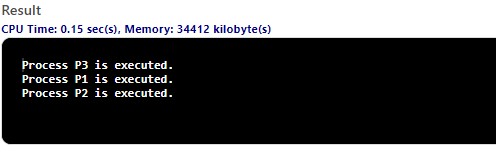
The Process P3 with the shortest burst time gets executed first, followed by Process P1, and then Process P2, just like we want it to. Interesting, right?
Conclusion
And we're done with the second part of our 3-part series! In this article, you have learned about the Shortest Job First Scheduling Algorithm and its implementation in Java. You can go ahead to try it out, add or remove processes, tweak a little and explore. In case you missed the first part of this series where we talked about the First Come First Serve Scheduling Algorithm, you can catch up here. Thanks for reading and see you there!


